V VelosBot
Home / Other Bots / Bybit
Live · Bybit P2P

Auto-pricing for
Bybit P2P — 4 coins.

The same VelosBot approach you trust on Binance, now built for Bybit. USDT, USDC, BTC, ETH — up to 2 buy + 2 sell ads per coin (16 ads total), block competitors by name, skip by holdings, plus the native Android app to control it all from your phone.

Official Bybit P2P API API key stays on your PC Android app included
At a glance
Coins supported USDT · USDC
· BTC · ETH
Max ads 2 Buy + 2 Sell / coin
Update frequency Every minute
Mobile app Included
Price
Free no license

What it does on Bybit

Built for serious Bybit P2P merchants who want to stay on top without watching the screen all day.

4 coins · 16 ads

Run USDT, USDC, BTC, ETH simultaneously — up to 2 buy + 2 sell ads per coin (16 ads total). Each ad has its own pricing rules, limits, and target competitors.

Min & Max limit competition

Only compete with merchants whose order limits overlap with yours. Avoid wasting price moves on irrelevant competitors.

Deadzone & fallback price

Set a deadzone so the bot doesn't make tiny pointless adjustments. If no competitors are found, fall back to your default safe price.

Filter out small ads

Ignore competitors with tiny remaining quantity — they're not real competition. Your bot won't chase a $50 ad floor.

Android remote-control app

Same app you get with the Binance bot. Change prices, tune competition rules, update filters from anywhere.

API key never leaves your PC

Your Bybit API key is stored locally on your computer. Our server never sees it — even if we got hacked, your funds are safe.

Block merchant by name

Type a competitor's Bybit username and the bot will never compete with them — they're skipped from the price match. Perfect for ignoring known undercutters or merchants you don't want a price war with.

Skip by crypto holdings

Set a minimum threshold for competitor crypto balance. Merchants with less than your set amount get skipped automatically — your bot only competes with serious players, not small-fry ads from new accounts.

How it works

Three steps. Same as the Binance bot — if you've used VelosBot before, this will feel familiar.

1

Get a Bybit API key

In Bybit, create an API key with P2P read & trade permissions. We recommend whitelisting your home IP if you have a static one.

2

Run BotClient on your PC

Open VelosBot.exe on your Windows PC. Paste your Bybit API key and your secret. The bot starts watching the market.

3

Control from your phone

Install the Android app and configure your 2 buy + 2 sell ads. Change prices and rules from anywhere — bot keeps running on your PC.

Why VelosBot

Most Bybit bots leave you stuck at your PC.
We don't.

VelosBot for Bybit ships with the same native Android app you'd get with our Binance bot. Change pricing, tune competition rules, update filters — without ever opening Telegram or going home to your desktop.

Bot @ home
You · anywhere
YouTube

Watch the tutorials

Two short videos walk you through the whole thing. Setup in under 10 minutes total.

VelosBot Setup — Bot + Android App

Full walkthrough: install the Windows bot, install the Android app, and start it. Free to download and use. Works the same for Binance and Bybit.

Bybit API Key Setup (Safe — Ads Only)

Step-by-step on creating a Bybit API key with only Fiat Trading → Ads permission. Nothing else. Your funds physically cannot be touched.

Setup takes about 5 minutes and every step is in the guide above — the bot is 100% free. Prefer we set it up for you? We offer a done-for-you setup for $100 (100 USDT).

Network Tron (TRC-20)
Amount 100 USDT
USDT address (TRC-20 only)
TAhGk5degm8sazeapq5Ddx548y77hMDdoW

After paying, send a screenshot of the transaction on WhatsApp or Telegram to confirm and we'll set up your bot.

See it in action

Real screenshots from the Bybit Android control app.

Bybit Buy Bots — USDT, USDC, BTC, ETH coins

Buy Bots overview
USDT · USDC · BTC · ETH

Bybit Settings & Filters — PLN market, update interval, compete with options

Settings & Filters
Market · Interval · Compete With

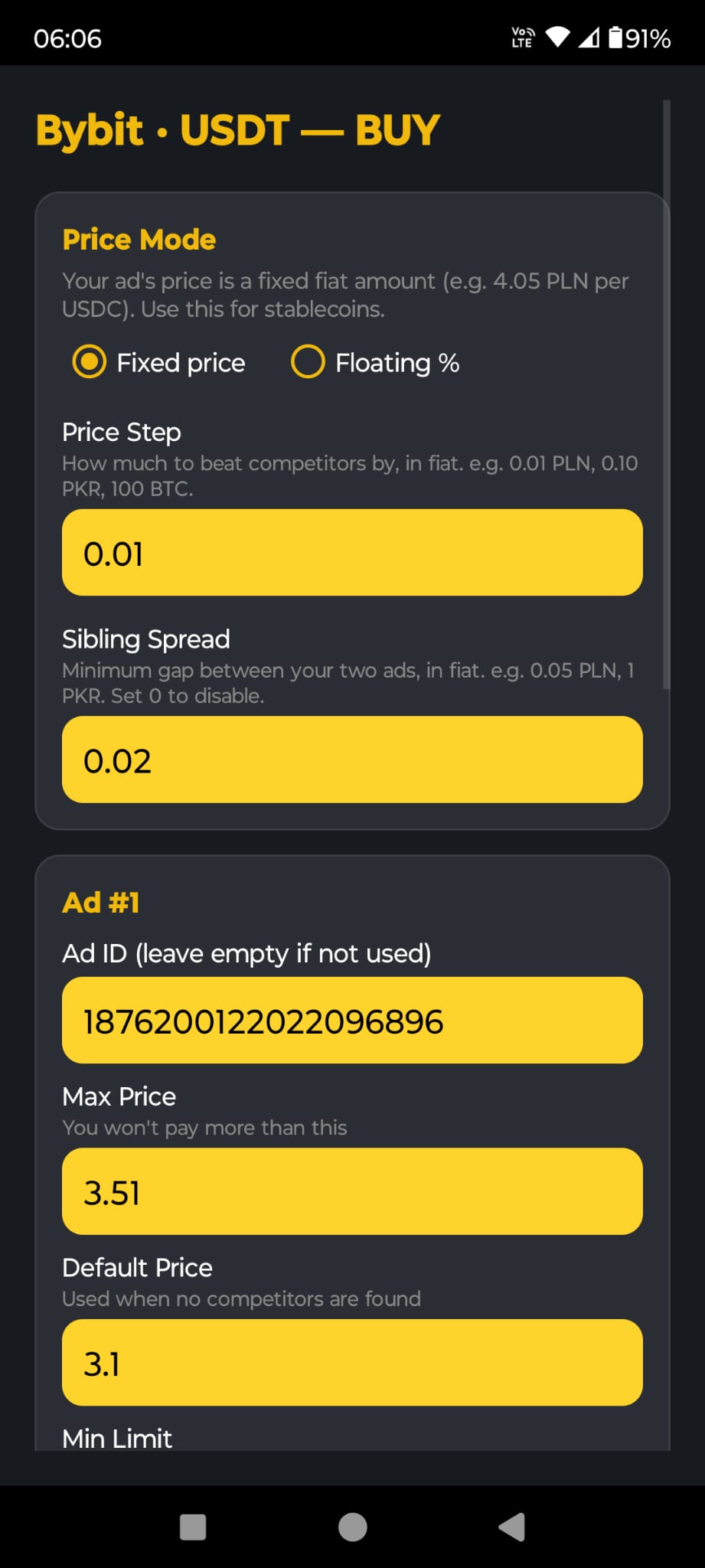
Bybit USDT Buy ad config — Price Mode, Price Step, Sibling Spread

Price Mode & Spread
Fixed · Floating · Step

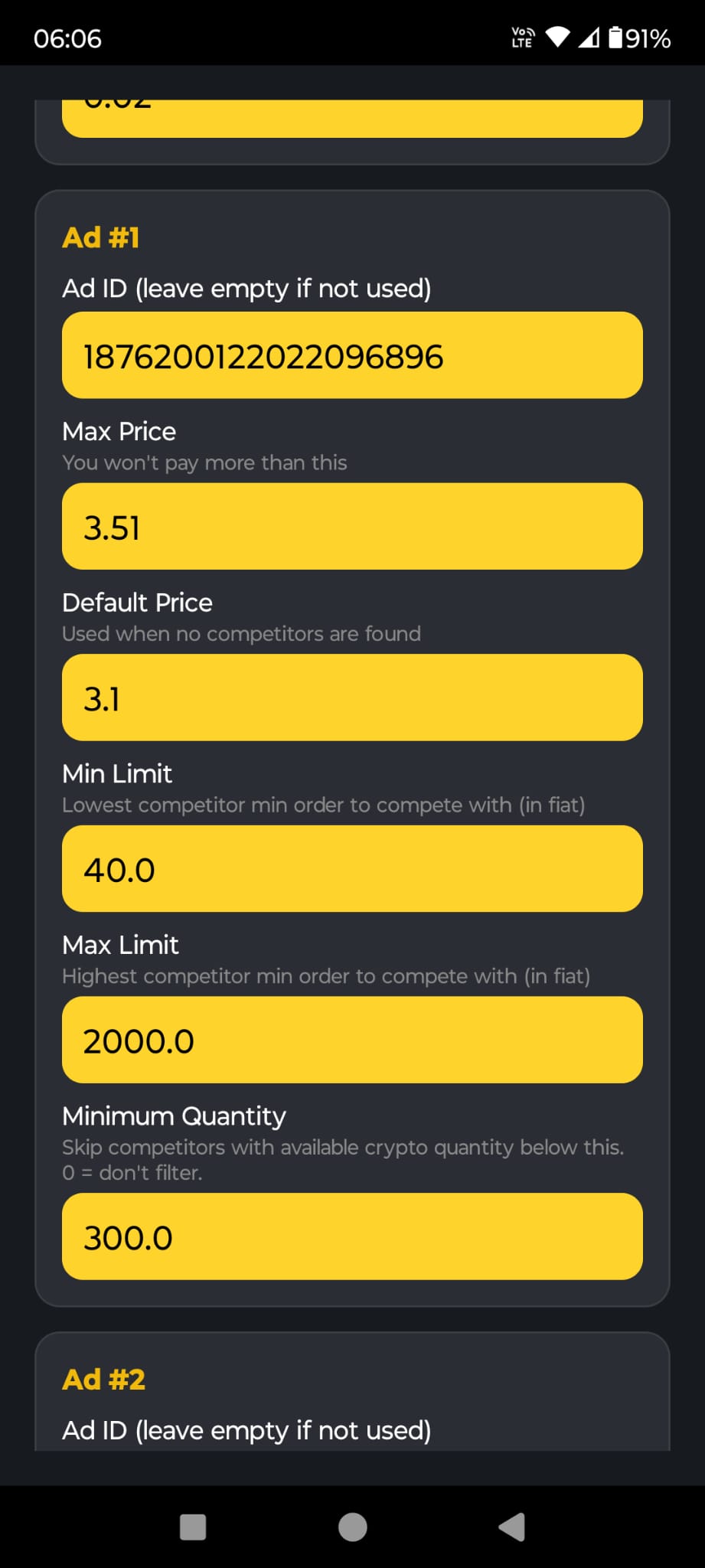
Bybit ad limits — Min Limit, Max Limit, Minimum Quantity skip-by-holdings

Ad Limits & Min Qty
Skip-by-holdings filter

Your funds stay safe

API permissions — exactly what we need, nothing more

VelosBot uses Bybit's most restrictive scope: Fiat trading → Ads only. It can read your P2P ads and update their prices. Nothing else. No spot trading, no futures, no withdrawals, no wallet transfers.

What you enable
  • API Permissions: Read-Write
  • Scroll down to Fiat Trading → tick Ads
  • Leave every other Fiat-Trading sub-option unticked
On Bybit: Account → API Management → Create API Key → System-generated → API Permissions = Read-Write → scroll to Fiat Trading → tick only Ads. Save.
What you NEVER tick
  • Wallet → Withdrawal / Transfers
  • Unified Trading · Spot · Derivatives
  • Earn · Convert · Copy Trading
  • Other Fiat Trading sub-options
We never ask for any of these. If something prompts you to tick more than Ads under Fiat Trading, stop — that's not us.

Even if our server got hacked tomorrow…

attackers couldn't withdraw a cent from your Bybit account. They couldn't open trades, move crypto between wallets, accept or reject P2P orders, or release coins to a buyer. Your funds physically cannot be touched through an Ads-only key.

On top of that: your API key is stored locally on your own PC in bybit_api.json — our server never sees it. Even a full breach of velosbot.com gives an attacker zero access to your keys.

Talk to us before you start.

Message us any time. We will answer your questions and help you set up the bot for your Bybit account.